SEAMIQ · AssetIQ

Asset management built for the mine, not the head office.

AssetIQ runs the maintenance work your planners do every shift and the lifecycle economics your managers answer for every year. Services fall due by the meter, defects are logged at the machine, every component carries its lifetime history, and the Adaptive Lifecycle Engine tells you what fails next and what it will cost.

Any OEMMobile-readyMulti-siteMulti-currencyLive in weeks
AssetIQ · Adaptive Lifecycle Engine
AssetIQ Adaptive Lifecycle Engine showing projected component spend and fleet survival curve
Where the cost hides

An unplanned stop costs more than the repair

The invoice for the breakdown is the smallest line. The rest is spread across the shift report, the stores ledger and next year's budget, where nobody adds it up.

01
The tonnes that did not move
Production carried by the rest of the fleet, or not at all. The loss lands on the mine's result, never on the maintenance one, so it is never argued back into the maintenance budget.
02
The crew that was pulled
Technicians taken off planned work to attend the breakdown. The planned job slips, and so does the service behind it.
03
The reactive premium
The air-freighted part, the overtime, the call-out, because nothing was on the shelf and no one knew it would be needed.
04
Secondary damage
A component run to failure takes its neighbours with it. The repair that should have been one line is three.
05
The service that was deferred
The PM that moved to make room for the breakdown. The next failure is already in motion, and it will not be recorded as a consequence of this one.
06
The cause nobody wrote down
A downtime entry that says the system, not the reason. No reason code, no pattern, and the same failure next quarter.
AssetIQ records each of these as it happens, against the component, with a reason code and the hours lost, so the cost of a breakdown is a number on a record rather than an argument in a meeting. The budget built from those records is the first one the finance team and the maintenance team read the same way.
What it covers

The whole maintenance office. One system.

Work orders and PM calendar
Services, defects and repairs as jobs on one order. Month, week, capacity and resource views.
Defects and backlog
Logged at the machine with photos. Stay visible until a planner puts them on an order.
Components and rotables
Lifetime hours, hours since rebuild, rebuild count, durability. History follows the component between parents.
Downtime and availability
Down time and wrench time kept apart. Reason codes on every event. PA%, MTBF, MTTR by machine and site.
Adaptive Lifecycle Engine
Fleet survival curves, P50/P80/P95 replacement windows, risk ranking and 60-month spend projection.
Budget and lifecycle cost
Versioned annual budgets phased monthly, built from strategy tasks and component projections. Budget versus actual live.
Critical spares
A, B, C classification, time-phased demand, reorder intelligence, stockout risk register, pool spares.
Shutdown planning
Frozen scope, Gantt, critical path, resources, spares readiness, change register, earned value, close-out.
Why mining is different

Generic maintenance software breaks on four mining facts

The clock is the meter
Wear accumulates with engine hours and tonnes, not weeks. A calendar-based PM is wrong the first time a truck runs a double shift, and most do.
Components outlive machines
A transmission is pulled, rebuilt and fitted to a different truck. If the record does not follow it, the fleet's life data is wrong and the budget built on it is wrong too.
The budget is the fleet
Capital exposure is set by component life, not by last year's number plus escalation. Finance and maintenance need the same figures from the same records.
The work is in the pit
The person who finds the defect is standing next to the machine with gloves on. If the system needs a desk, the defect goes on a notepad and dies there.
How it works

Three jobs. Every shift, every month, every year.

A maintenance operation runs on three clocks. AssetIQ runs all three from one set of records.

01
Run the shift
Work orders, PM calendar, defects, standard jobs, checklists, shift handover. What is down, what is due, who is on it. Technicians log work and meters on a phone.
See the board
02
Run the fleet
Components and rotables with lifetime history, downtime with reasons, availability by site, CBM rules, fleet compliance, premature failure detection.
See the components
03
Run the money
The Adaptive Lifecycle Engine, versioned budgets, critical spares and shutdown planning. What fails next, what it costs, what to buy, when to stop the plant.
See the forecast
Planning

The month's work on one board

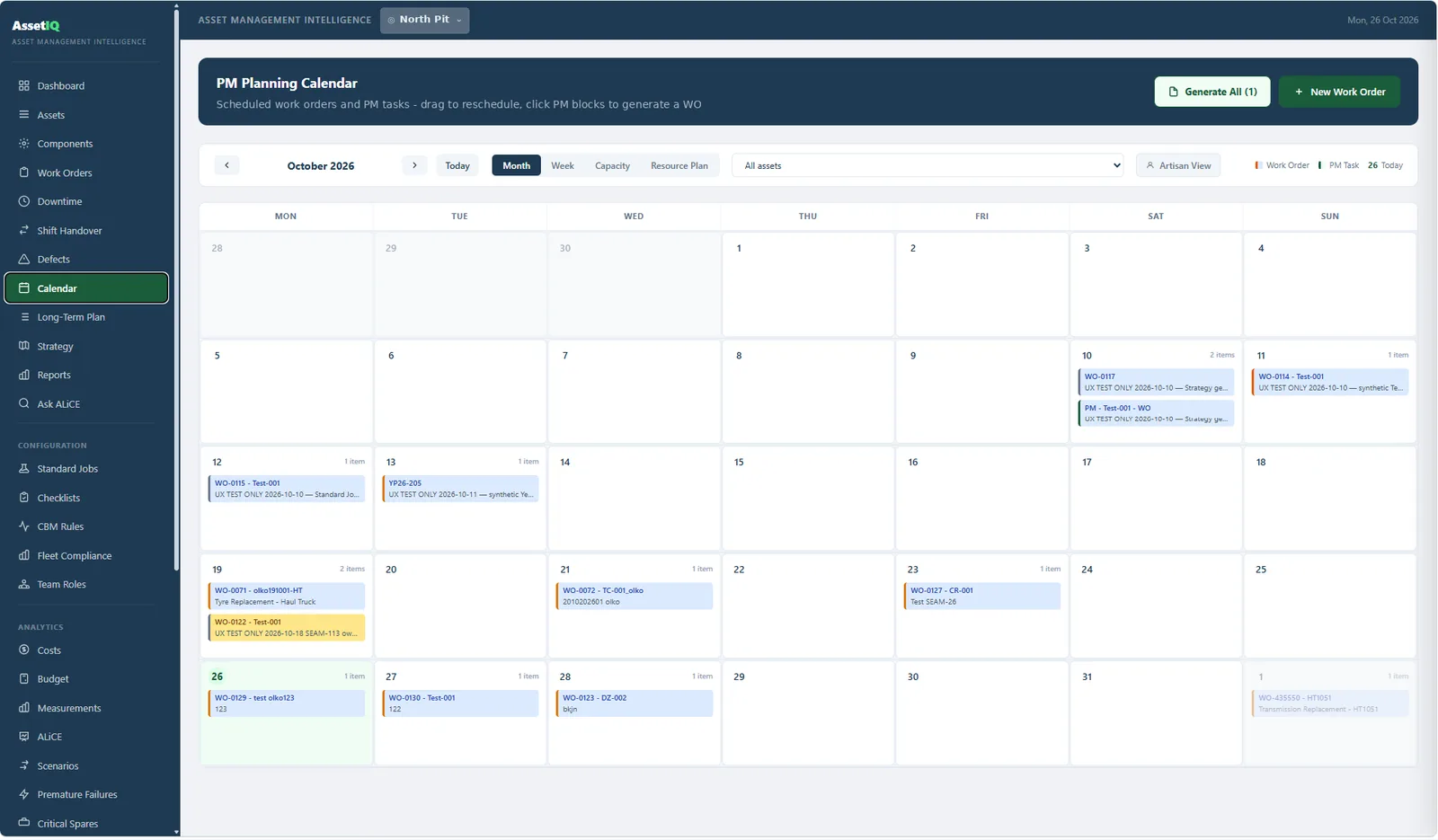
Every scheduled work order and PM task for the site on a calendar you can drag. Month, week, capacity and resource plan views of the same work. PM blocks generate their work orders in one click, and the artisan view shows each technician their own day.

  • Work orders and PM tasks together, by site or by asset
  • Capacity and resource plan views for the planner
  • Generate work orders from due PM in bulk
  • Artisan view: one person, one shift, one list
AssetIQ · PM planning calendar
AssetIQ PM planning calendar with work orders and PM tasks on a monthly board
Components

One record per component, however many machines it lives on

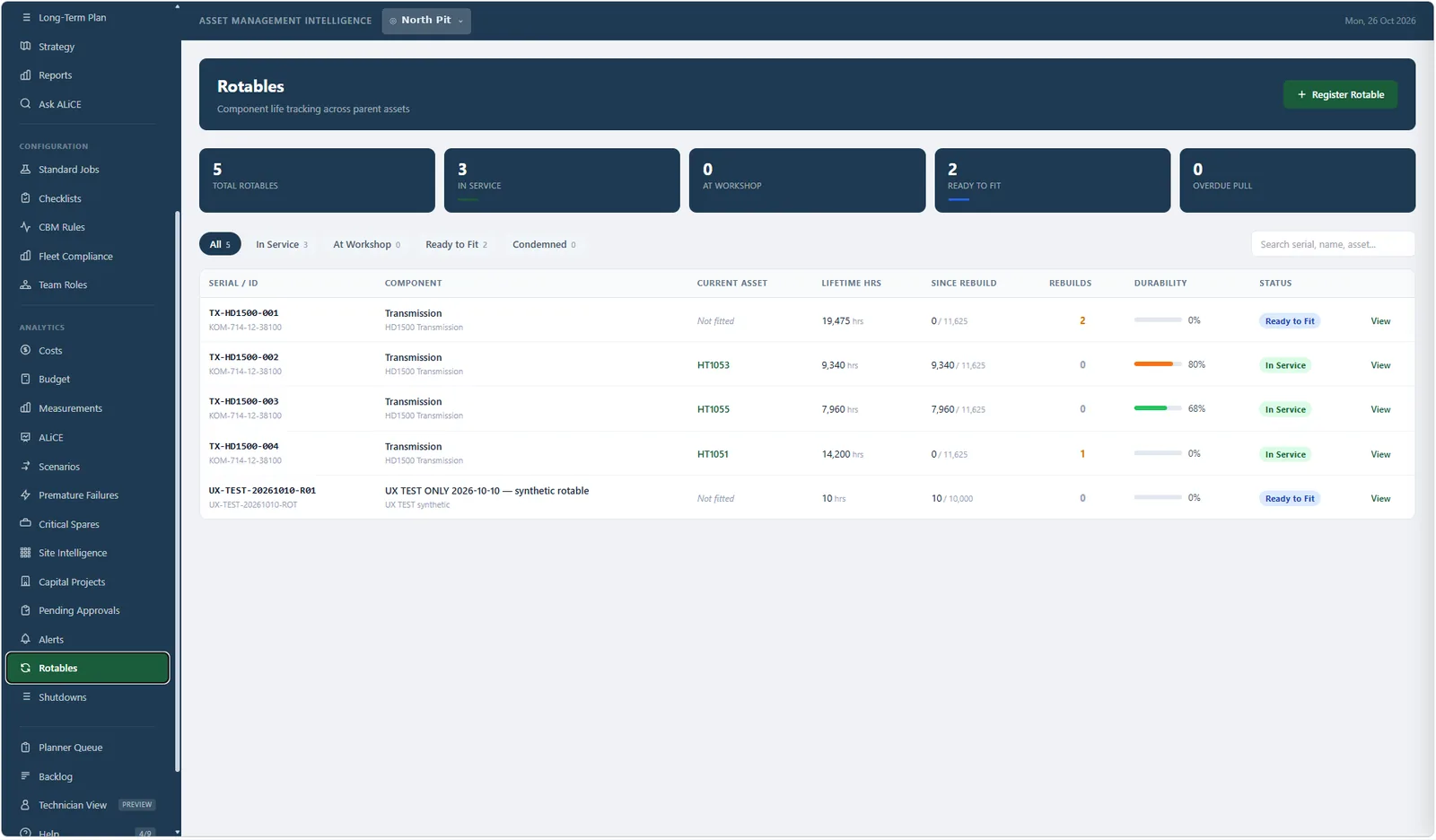
A rotable keeps its serial, its lifetime hours, its hours since rebuild and its rebuild count whether it is in service, at the workshop, ready to fit or condemned. Fit it to a different truck and the history comes with it. Durability against design life is visible on the register, not buried in a report.

  • In service, at workshop, ready to fit, condemned, overdue pull
  • Lifetime hours and hours since rebuild tracked separately
  • Rebuild count and durability percentage per component
  • Component history feeds the lifecycle engine directly
AssetIQ · Rotables
AssetIQ rotables register showing transmissions with lifetime hours, rebuilds and durability
Adaptive Lifecycle Engine

Your fleet's survival curve, not the OEM's brochure

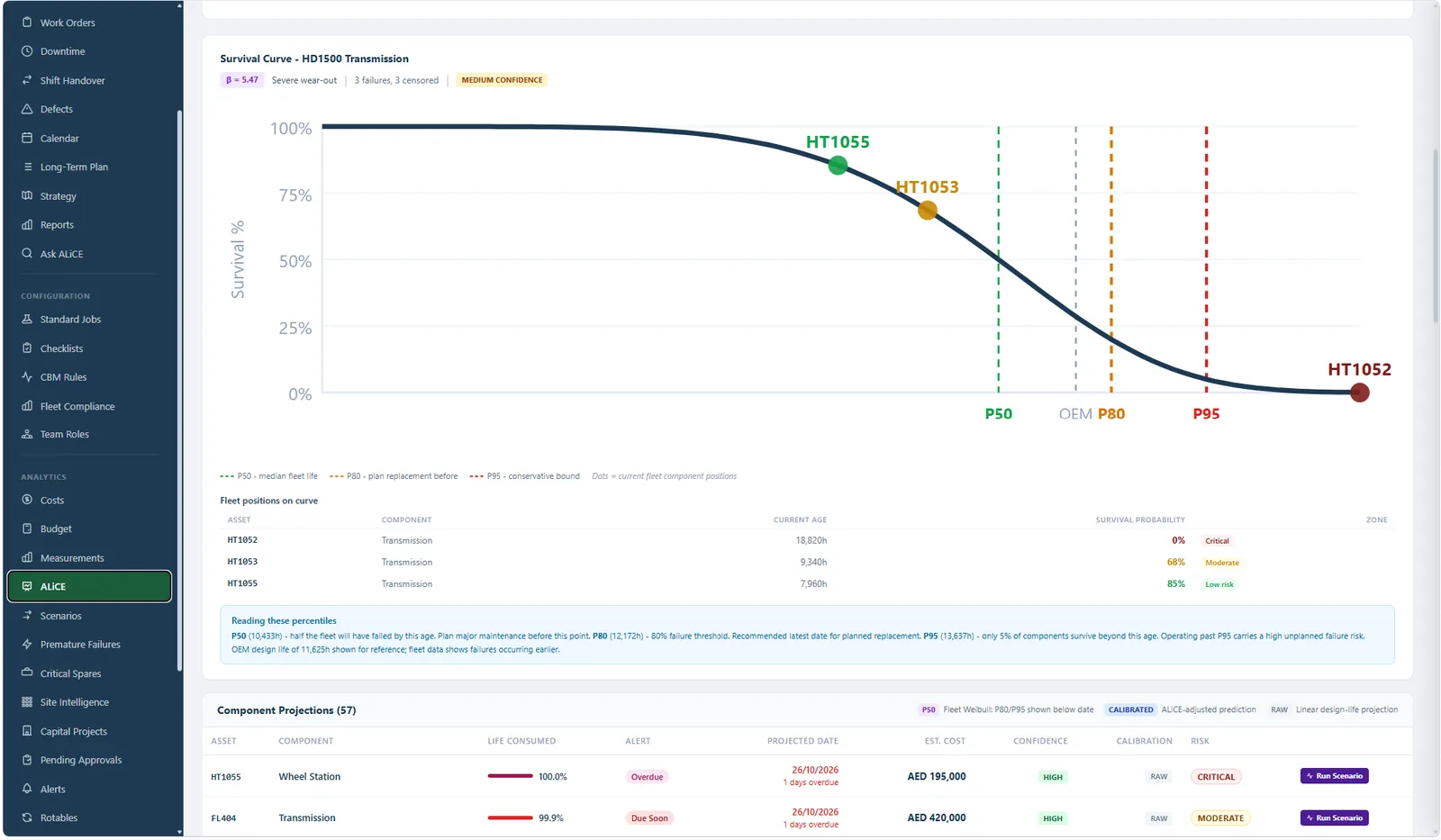
The engine fits a survival curve to your own failure and censored data per component type and model, then plots every live component on it. P50 is the median fleet life. P80 is the latest date to plan replacement. P95 is the conservative bound. The OEM design life is shown alongside for reference, and in most fleets the curve says the parts fail earlier than the brochure claims.

  • Weibull fit with shape parameter and confidence shown, not hidden
  • Each component's current age and survival probability on the curve
  • Low risk, moderate and critical zones per component
  • Honest about data: falls back to design life and says so
AssetIQ · Survival curve
AssetIQ survival curve for a transmission fleet with P50, P80 and P95 markers
Capital

Component spend, 12 to 60 months out

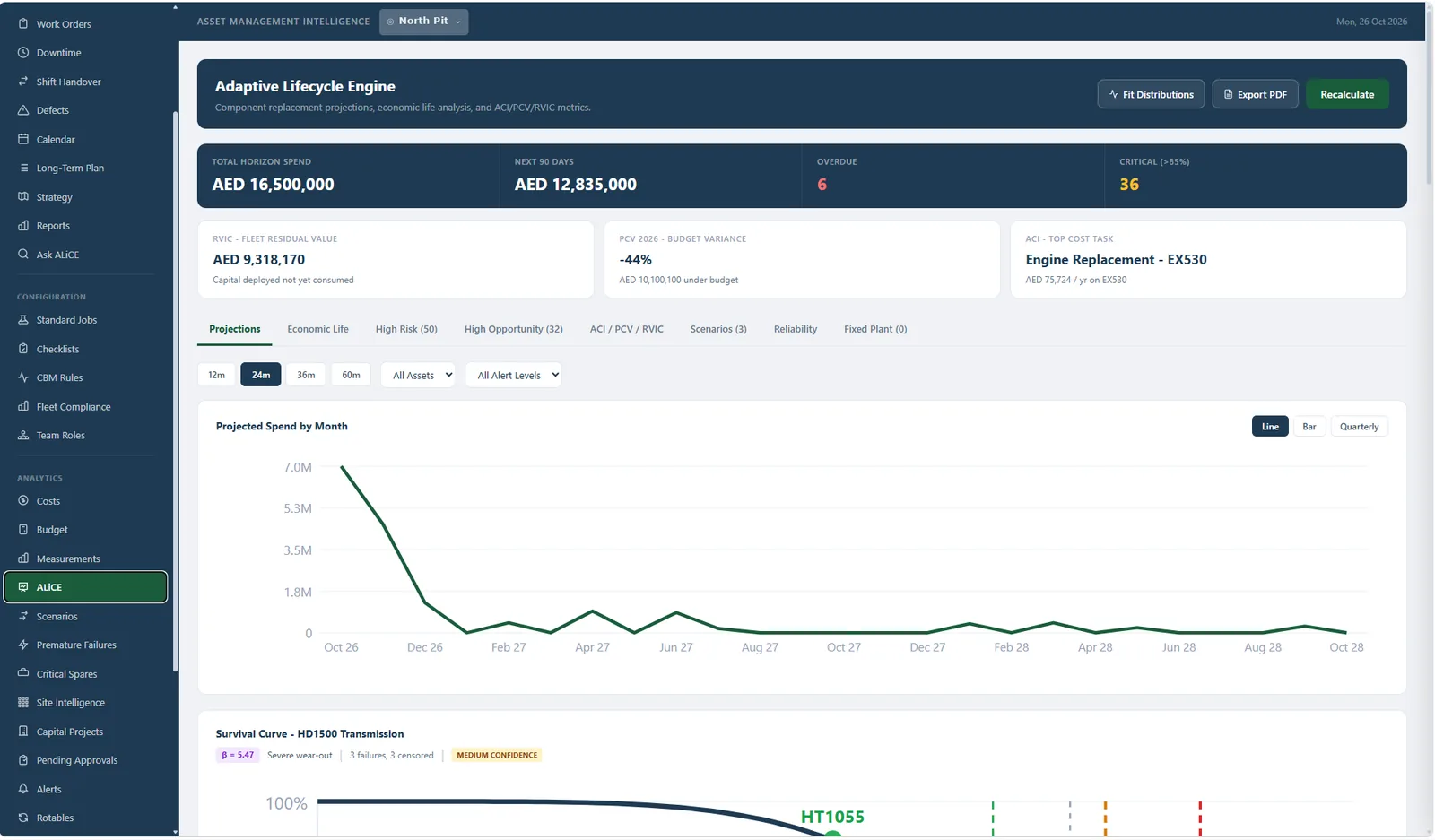
Every projection rolls up into a monthly replacement spend forecast with the 90-day exposure, the overdue count and the critical list on top. Residual fleet value, budget variance and the single most expensive task are one glance. Run a scenario on any line without touching the live plan.

  • Total horizon spend and next-90-day exposure
  • High risk and high opportunity lists, ranked
  • Residual value and cost index per asset
  • Scenarios, economic life and reliability tabs on the same data
AssetIQ · Projections
AssetIQ Adaptive Lifecycle Engine projected spend by month over 24 months
Budget

The budget built from the fleet, not from last year

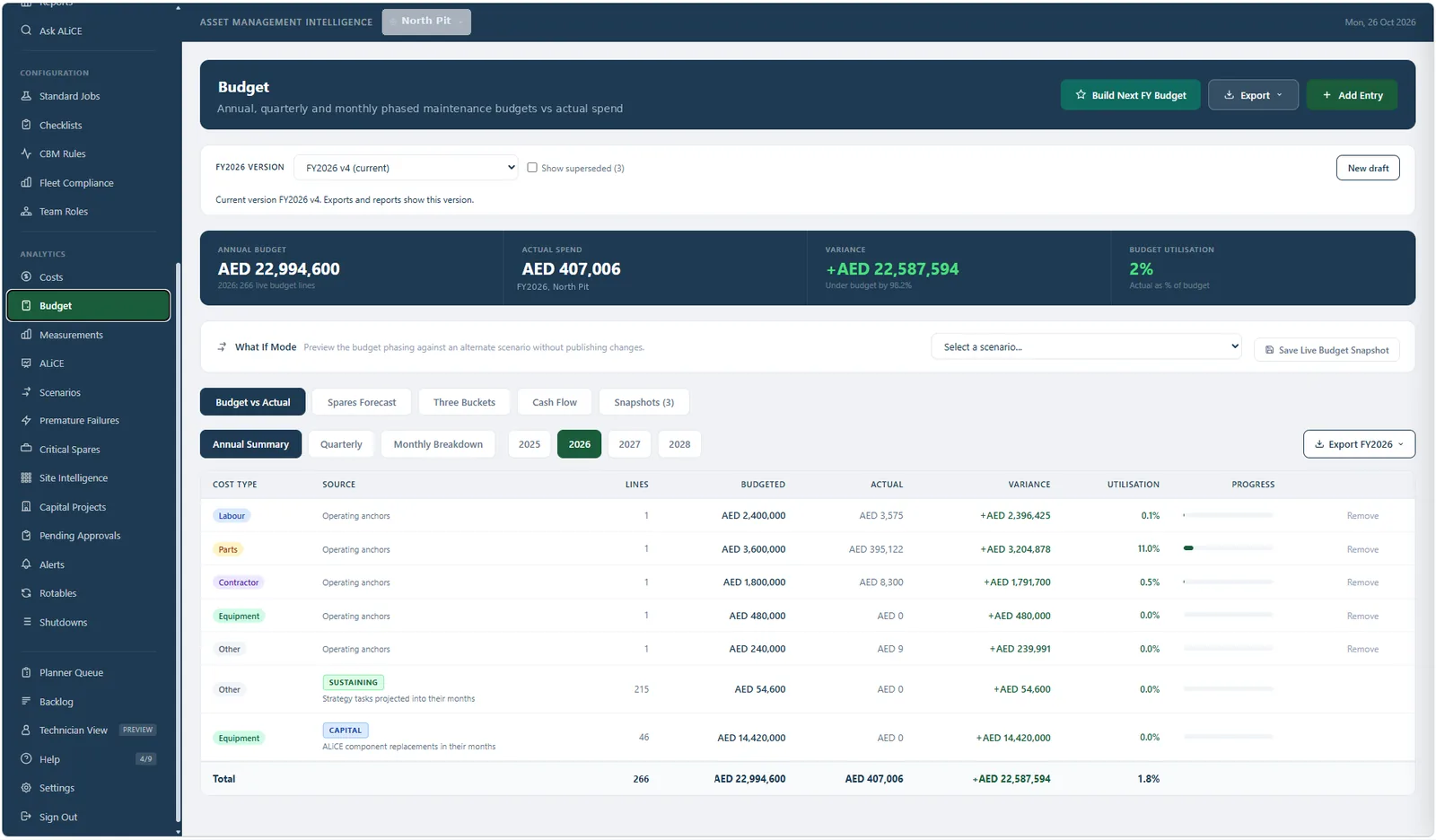
Operating anchors by cost type, sustaining lines projected from strategy tasks, and capital lines projected from the lifecycle engine, phased into the months they fall. Versioned, so FY2026 v4 is the one exports and reports show. What-if mode previews a scenario without publishing it. Budget versus actual updates as work orders close.

  • Annual, quarterly and monthly phasing with version control
  • Three-bucket contingency: common, rare reserve, black swan
  • Spares forecast and cash flow from the same model
  • Export the current version for finance in one click
AssetIQ · Budget
AssetIQ budget versus actual with versioned FY2026 budget and cost type breakdown
Spares

The stockout you can see coming

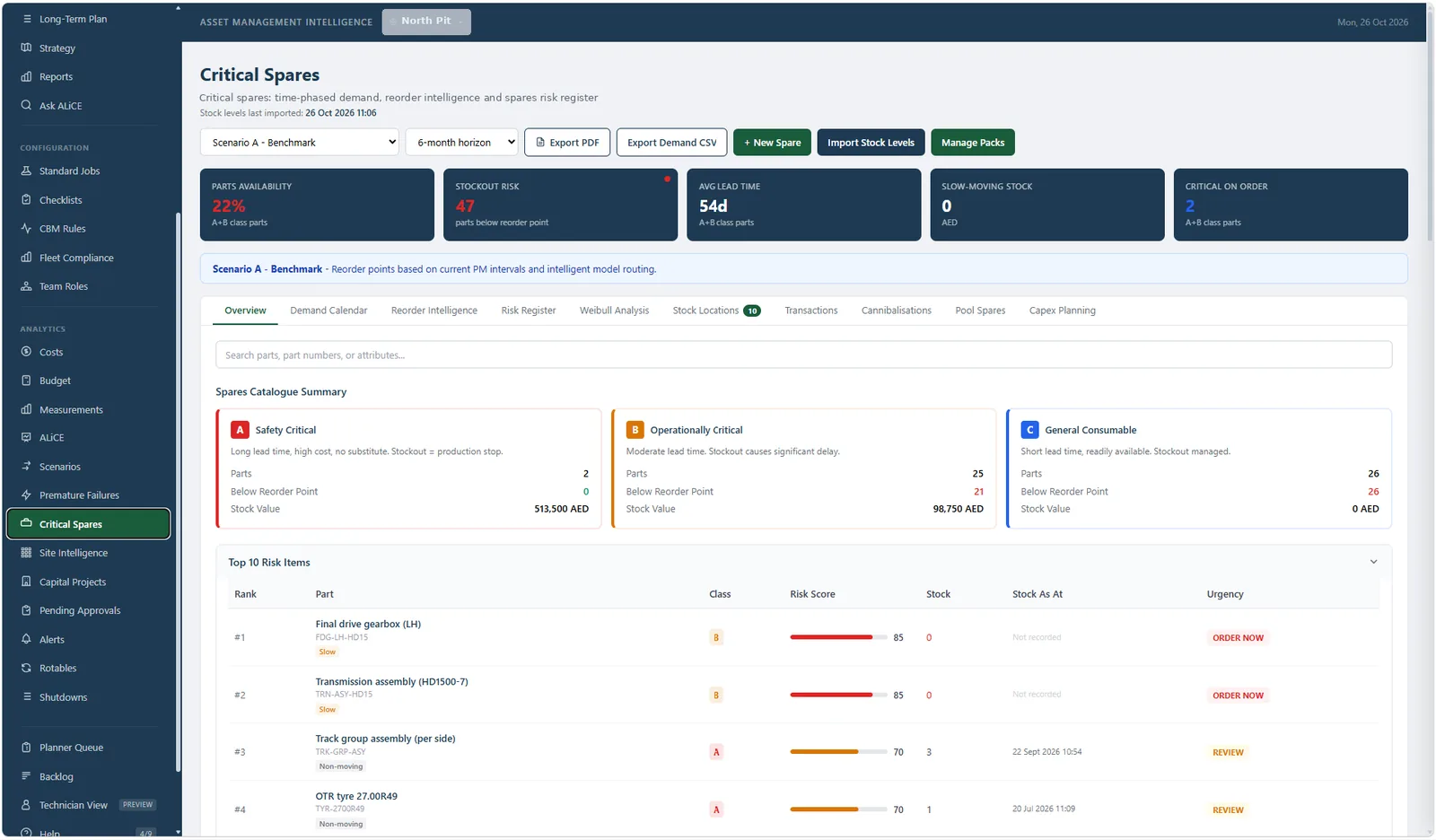
Parts are classified A, B or C by criticality and lead time. Demand is time-phased from the maintenance plan and the lifecycle projections, not from last year's issues. Reorder points follow the plan. The risk register ranks what to order now, what to review and what is slow-moving money on a shelf.

  • Parts availability, stockout risk and lead time on one strip
  • Top risk items ranked with an order-now flag
  • Demand calendar, reorder intelligence and Weibull analysis tabs
  • Stock locations, cannibalisations, pool spares and capex planning
AssetIQ · Critical spares
AssetIQ critical spares overview with risk register and parts classification
Shutdowns

A shutdown with a frozen scope and a critical path

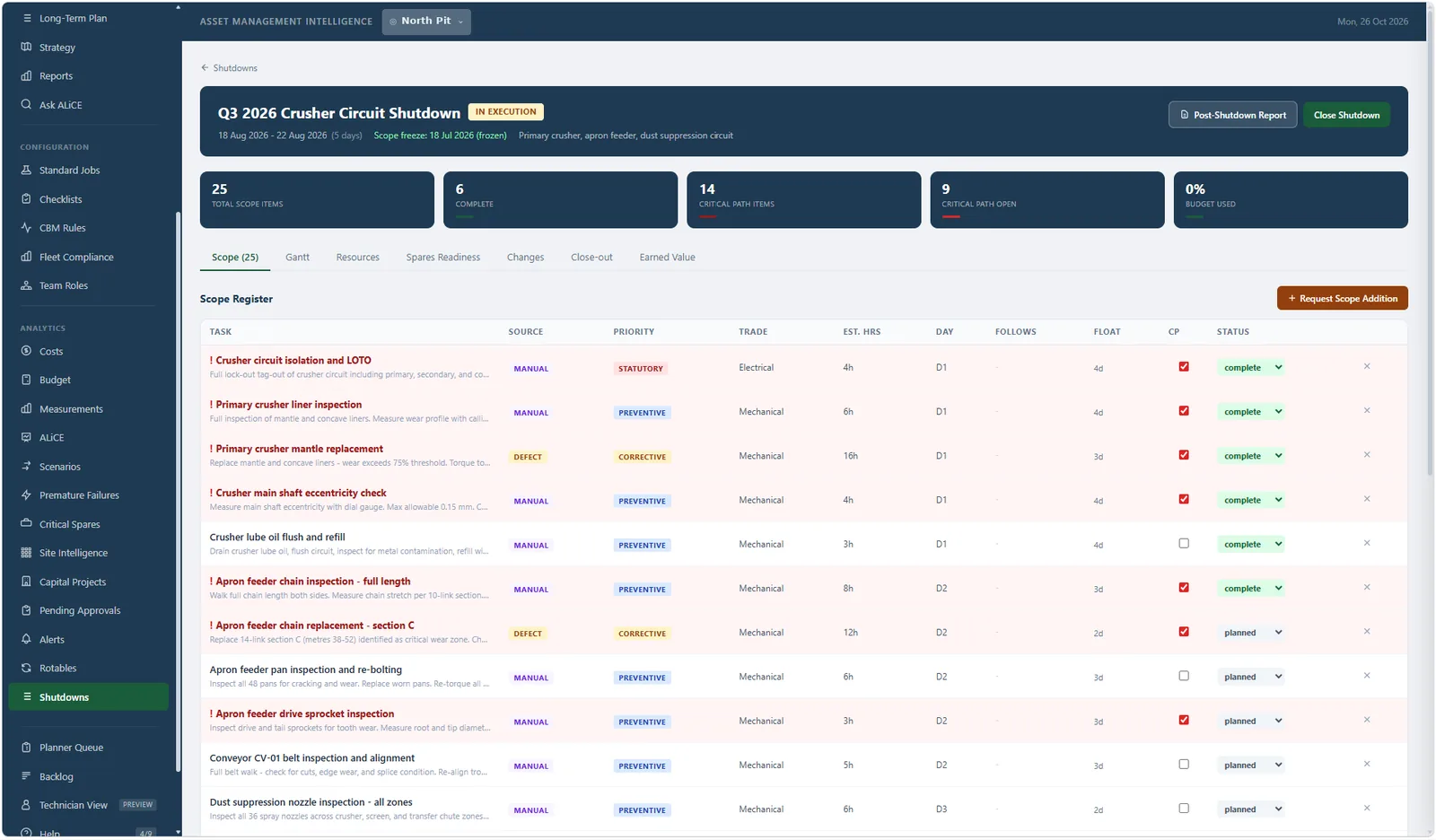
Scope items come from defects, strategy and manual additions, each with trade, estimated hours, day, float and critical-path flag. The scope freezes on a date. Changes after that go through a register. Gantt, resources, spares readiness, earned value and close-out are tabs on the same shutdown, and the post-shutdown report writes itself.

  • Scope register with source, priority, trade and float
  • Critical path items and critical path open, live
  • Scope freeze date and formal change requests
  • Post-shutdown report and earned value
AssetIQ · Shutdown
AssetIQ crusher circuit shutdown scope register with critical path and status
Also in the box

The rest of the maintenance office

Standard jobs and packs
Reusable job templates with labour, parts packs and multipliers. A work order inherits its costs the moment it is raised.
Checklists and inspections
Readings with limits, item conditions, photos, who completed it and when. The record an auditor asks for.
CBM rules
Condition thresholds on measurement points, oil analysis and telematics that raise work automatically.
Premature failures
Component types failing before 70% of design life, three or more times in 24 months, surfaced without anyone looking.
Technician view
A phone-first screen for the person at the machine: my jobs, this asset, log work, log a defect, scan a QR.
Shift handover
What is down, what moved, what is waiting on parts, handed from one shift to the next without a whiteboard.
Multi-site, multi-currency
Each site in its own currency with a locked exchange rate on every cost record. Consolidated in one reporting currency.
Integration
CSV import with column mapping for common maintenance systems, telematics meter feeds, and reporting views for your BI tool.
Buyer's checklist

How to judge an asset management system for a mine

Whatever you evaluate, AssetIQ included, ask to see each of these working on a screen with your own fleet data. Slides do not count.

Does a service fall due by the meter?
Engine hours or odometer, with a grace window. A calendar reminder is wrong the day a machine runs a double shift.
Can a component move between machines and keep its history?
A transmission on its third parent still has one lifetime record. If the system resets the clock on every install, the life data is fiction.
Is the budget built from the components or typed into a spreadsheet?
Ask to see a change in component life flow through to next year's capital line without anyone re-keying it.
Does it keep down time and wrench time apart?
A system that only records how long the job took cannot explain availability.
Does every breakdown carry a reason?
Primary and secondary codes from a list, so the third coolant hose failure in a season shows up as a pattern.
Will a fitter log a defect at the machine?
With a photo, in under a minute, on the device in their pocket. Backlogs that are hard to log do not get logged.
Does a spares risk show before the stockout?
Reorder points should come from the maintenance plan and the lead time, not from a stores clerk's memory.
Can a shutdown scope be frozen?
A shutdown without a frozen scope, a critical path and a change register will overrun. Ask to see all three on one screen.
Questions people ask

Questions people ask about AssetIQ

Is AssetIQ a CMMS or an EAM?
Both labels fit and neither is the point. AssetIQ runs the day-to-day maintenance work a CMMS runs (work orders, PM scheduling, defects, standard jobs, checklists, parts) and carries the lifecycle, budget and reliability layer an EAM is sold for. The difference is that the two are one system, so the budget is built from the same component records the planner is scheduling against.
Does it work with a mixed OEM fleet?
Yes. Makes, models, component types and service strategies are all configured per operation. Haul trucks, excavators, loaders, drills, crushers and conveyors from any manufacturer are managed on one register with one set of KPIs. AssetIQ carries no OEM-specific vocabulary and no preference for any manufacturer's parts or service.
What does the Adaptive Lifecycle Engine actually do?
It fits survival curves to your own component failure history and uses them, rather than the OEM brochure figure, to project when each component reaches end of life, with P50, P80 and P95 bounds. Those projections roll up into a 12 to 60 month replacement spend forecast, a residual fleet value, and a ranked list of the highest-risk and highest-opportunity components. Where there is not yet enough history it says so and falls back to design life, labelled as such.
Can we import from the system we run today?
Yes. Asset registers, component lists, parts catalogues and open work are imported from CSV with column mapping for the common maintenance systems and ERP exports. A typical site is loaded in days. Telematics and ERP connections are added after go-live, not as a precondition for it.
Does it work on a tablet in the field?
AssetIQ is a responsive web application with a dedicated Technician View for logging work, defects, meters and inspections on a phone or tablet. Large tap targets, minimal typing, QR asset lookup. No app store install.
How long does deployment take?
A single-site pilot with live data is measured in weeks from sign-off. Multi-site rollouts add sites without re-implementation; each site keeps its own configuration and currency while management gets one consolidated view.
Is our data kept separate?
Each operation is a separate tenant with row-level isolation. Nothing crosses between customers. You can export everything you have entered at any time.
How is it priced?
Per site, with no named-user licences, so adding planners, supervisors and technicians costs nothing. We would rather every person who touches a machine is in the system than count seats.
AssetIQ
Let's talk

See AssetIQ on your own fleet

Send us your fleet list and the service strategies you run today. We load your makes and models and walk a month of maintenance through AssetIQ with your machines on the screen. If it is not a fit, we will tell you.

Or email us directly: info@seamiq.io

No mailing lists. We reply personally within one working day.
The platform

Explore the other products